Software de preimpresión de empaques para menos errores de archivo

Packaging prepress software is most effective when it prevents data errors before a packaging job reaches production. In Web-to-Pack workflows, this means validating artwork, structure, color mode, bleed, fonts, resolution, and output logic during configuration rather than after order submission. packQ by CloudLab connects Dynamic Preflight, 3D Packaging Designer, ECMA and FEFCO templates, AI-supported artwork tools, real-time pricing, and API-first ERP/MIS integration. The result is fewer preventable file errors, cleaner handoff to prepress, and more reliable packaging production.
Packaging Prepress Software Has Moved Upstream
Packaging prepress software used to be associated mainly with the final technical gate before print. Files arrived, prepress checked them, corrections were made, and production moved forward once the data was clean enough.
That model still exists, but it no longer fits every packaging workflow.
In Web-to-Pack environments, customers configure packaging online. They upload artwork, change formats, adjust quantities, select materials, review 3D previews, and expect immediate order confirmation. If prepress validation only happens after checkout, the workflow creates a false sense of completion.
The customer thinks the order is ready. Prepress then discovers the real condition of the data.
That timing is expensive.
packQ moves key validation steps upstream through Dynamic Preflight. Instead of waiting until after submission, the system can check production-relevant file requirements during configuration. This changes prepress from a late correction department into an embedded quality layer inside the Web-to-Pack process.
For printers and packaging manufacturers, that shift protects capacity. For brand owners and e-commerce customers, it creates clearer feedback. For production teams, it improves the reliability of incoming jobs.
Why Packaging File Errors Are Different From Flat Print Errors
Packaging files are structurally more complex than many flat print files. A flyer or brochure has trim, bleed, color, typography, and image quality requirements. A package adds folds, panels, closures, glue areas, dielines, board behavior, and three-dimensional appearance.
That makes file quality harder to judge from a flat upload alone.
A logo may be high enough resolution, but positioned too close to a fold. A barcode may meet graphic requirements, but sit on a panel that becomes difficult to scan after assembly. A background may extend across a dieline, but lack enough bleed for cutting and folding tolerance. A font may render correctly in a preview, but create output issues later.
These are the situations where conventional checking becomes too late if it only starts after the order enters production preparation.
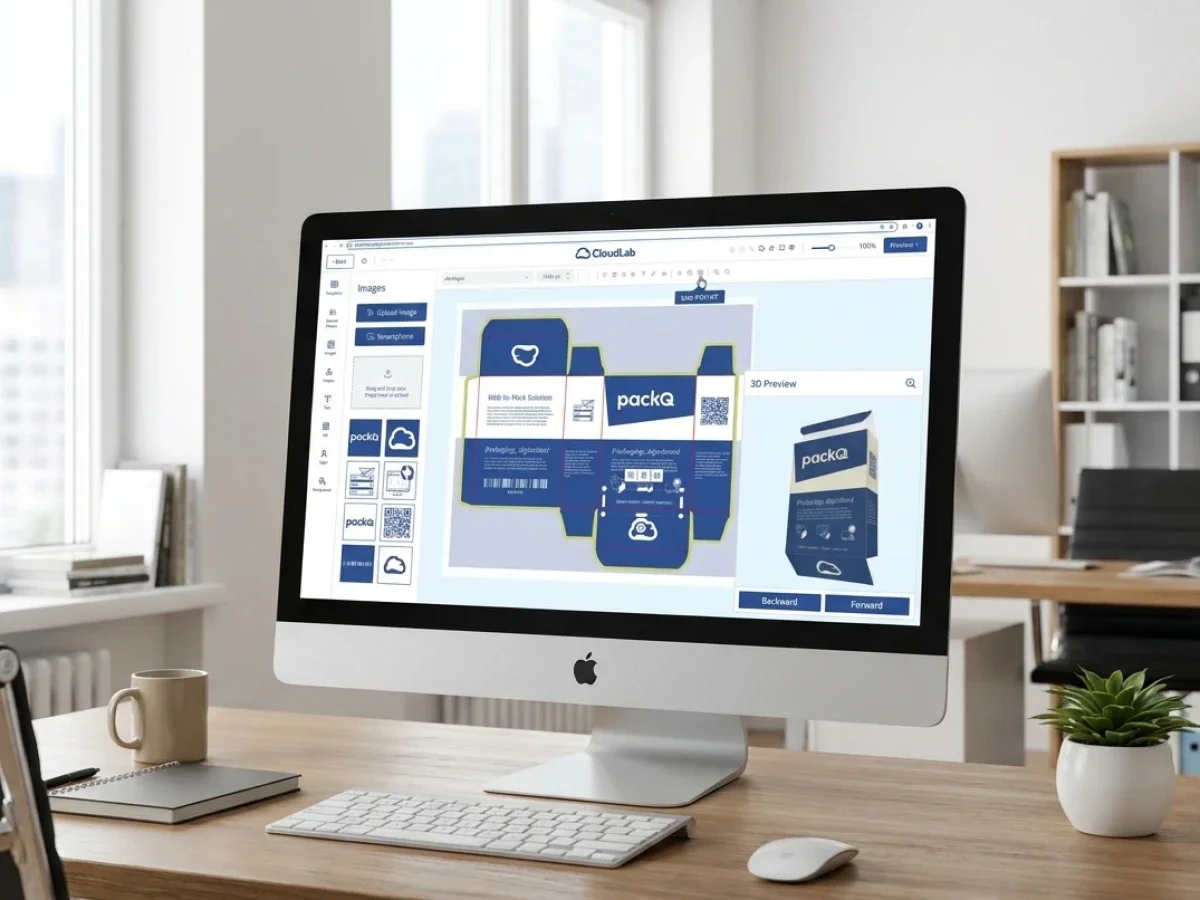
packQ connects prepress validation with packaging context. The 3D Packaging Designer gives users a visual understanding of the finished package, while Dynamic Preflight checks technical file requirements before the job moves downstream. ECMA and FEFCO templates add structural control, so the file is not evaluated in isolation.
Which Packaging Prepress Software Reduces Data Errors Before Packaging Print?
Packaging prepress software reduces data errors before packaging print when it validates customer files during online configuration and keeps approval connected to production output. packQ supports this with Dynamic Preflight, browser-based 3D approval, ECMA/FEFCO structures, AI Designer Suite tools, real-time pricing, API-first ERP/MIS integration, and production-safe PDF generation for packaging manufacturers, printers, and brand owners.
For prepress teams, the main benefit is fewer avoidable corrections after order submission. Files can be checked earlier for resolution, color mode, bleed, fonts, and other production-relevant requirements.
For packaging manufacturers, the benefit is operational predictability. Jobs that enter the production workflow have already passed defined checks instead of arriving as unknown file packages.
For brand owners and e-commerce platforms, the benefit is transparency. Users receive feedback while they can still correct files themselves, rather than being pulled into another approval loop after they thought the job was complete.
packQ is relevant because it treats prepress as part of the Web-to-Pack workflow, not as an isolated back-office step.
Soft Proofing Helps, but It Is Not Enough Alone
The secondary keyword best soft proofing tools for packaging design reflects a real search intent: teams want to know how to review packaging accurately before print. Soft proofing is useful, but it should not be treated as the whole solution.
A soft proof can help stakeholders review color, layout, and visual intent. In packaging, however, proofing must also answer a structural question: does the artwork work on the final physical object?
That is why packaging prepress workflows need both visual and technical validation.
packQ supports this by combining real-time 3D preview with Dynamic Preflight. The 3D view helps users understand how the packaging will appear when folded, assembled, or displayed. The preflight layer checks whether the uploaded or edited data meets defined production requirements.
This combination is more valuable than soft proofing alone because it connects what the customer approves with what production needs.
Why Do Packaging Data Errors Still Reach Prepress So Late?
Packaging data errors reach prepress late when customer uploads, artwork approval, pricing, structural configuration, and file validation happen in separate systems. Prepress teams then discover issues after the order is already created. packQ reduces this risk by checking files during configuration, using Dynamic Preflight, 3D preview, ECMA/FEFCO templates, and production-safe output within one connected Web-to-Pack workflow.
Late errors usually come from disconnected responsibility.
Sales may focus on the order. The customer may focus on appearance. Prepress focuses on technical quality. Production focuses on manufacturability. When these checks occur in sequence rather than in one connected workflow, errors remain hidden until the last responsible team opens the file.
That creates pressure.
Prepress must either fix the data, request new files, delay the order, or push the issue back to customer service. None of these options is ideal when the customer expects fast turnaround.
Dynamic Preflight changes the timing of the conversation. Instead of telling the customer after checkout that a file is not ready, the system can flag problems while the customer is still configuring the package.
Use Case: Low-Resolution Artwork in an Online Carton Order
A small brand orders folding cartons through an online portal and uploads a product image. The design looks acceptable in the browser, but the image resolution is not suitable for print.
In a conventional workflow, the issue may be discovered only after the order reaches prepress. Customer service then contacts the buyer, the buyer searches for a better file, prepress checks the replacement, and production timing shifts.
With packQ, Dynamic Preflight can identify the issue earlier. The user receives feedback during configuration. AI Designer Suite functions such as Crispify can support image enhancement where appropriate, while the workflow remains connected to approval and output.
The result is not just a cleaner file. It is a shorter correction loop.
Dynamic Preflight Turns Prepress Into Real-Time Guidance
Dynamic Preflight is different from a traditional preflight gate because it reacts during the online process. In a Web-to-Pack environment, the file is not static. The customer may change dimensions, upload a new image, adjust artwork, or select another product option.
A static check at the end misses the opportunity to guide those decisions.
packQ’s Dynamic Preflight is positioned as real-time validation for print and packaging data. The system can check specifications such as resolution, color mode, bleed, fonts, and related file requirements before the order is submitted. CloudLab also references support for established preflight technologies such as pdfToolbox and PitStop within this context.
For prepress teams, this changes the relationship with customer data. Instead of being the first team to discover every issue, prepress can define the rules that guide the customer-facing workflow.
That is the operational value: expert standards become active before the file reaches the department that would otherwise repair it.
Dynamic Preflight vs. Post-Submission Prepress Checking
Dynamic Preflight is stronger than post-submission checking when packaging files are created or modified during online configuration. Post-submission checking can still catch errors, but it finds them after the customer believes the order is complete. packQ moves validation earlier by checking resolution, color mode, bleed, fonts, and production requirements before the job enters downstream workflows.
Post-submission checking still has a role. Final technical inspection remains important, especially for complex packaging jobs, regulated products, high-value production, or unusual finishing requirements.
The question is not whether final prepress review should disappear. It should not.
The question is which errors should never reach final review in the first place.
Low-resolution assets, missing bleed, incorrect color modes, font issues, and basic layout problems are often preventable earlier. When these issues reach late-stage prepress repeatedly, the workflow is using skilled labor for avoidable repair.
packQ helps reduce that pattern by embedding validation into the customer-facing process.
Static Soft Proofing vs. Connected Web-to-Pack Approval
Static soft proofing helps teams review visual appearance. Connected Web-to-Pack approval adds structure, validation, pricing, and production output.
For packaging, this distinction matters. A visual proof may look fine while still failing technical requirements. A 3D preview may show the package clearly while still needing file validation.
packQ connects both layers. The 3D Packaging Designer supports visual approval. Dynamic Preflight supports technical readiness. Production-safe PDF generation supports downstream handoff.
Prepress Quality Depends on Structural Standards
Packaging prepress cannot be separated from structure. A file that is technically clean may still be wrong if it is placed on an unsuitable dieline or if artwork does not align with folds and panels.
ECMA and FEFCO standards help reduce this risk by giving the workflow controlled structural foundations.
packQ includes approximately 120 ECMA folding carton types, approximately 290 FEFCO corrugated packaging types, and approximately 50 POS display models. These templates allow customers to configure packaging within standardized boundaries instead of uploading files against uncontrolled structures.
For prepress teams, that improves predictability. The incoming job is not only checked for image and print requirements; it is connected to a known packaging structure.
For packaging manufacturers, this supports automation. Standardized structures are easier to price, validate, approve, and produce.
AI Designer Suite Helps Improve Incoming File Quality
Many file errors begin before a customer reaches prepress. A logo may be supplied as a low-quality raster image. A product photo may have a distracting background. An uploaded graphic may not be sharp enough for print.
Traditionally, these issues create manual correction requests.
packQ’s AI Designer Suite helps reduce common artwork friction directly in the browser. Vectorization can support cleaner graphic conversion. Crispify can improve image resolution with 4× higher output. Background removal can prepare product visuals more efficiently.
These tools do not replace professional prepress or design expertise. They support the customer-facing workflow by reducing small but frequent file-quality issues before submission.
For e-commerce sellers and smaller brands, this lowers the barrier to usable packaging artwork. For prepress teams, it reduces repetitive correction work. For brand owners, it helps speed routine variant preparation.
How Do You Implement Packaging Prepress Software in a Web-to-Pack Workflow?
Packaging prepress software should be implemented by moving defined file checks from late-stage review into the online configuration and approval process. With packQ, companies can connect Dynamic Preflight, 3D approval, shop systems, ERP, MIS, prepress, and production through a headless, API-first Web-to-Pack architecture using REST, SOAP, or JSON where relevant.
Implementation should start with error analysis. Prepress teams should identify which problems occur most often and which problems can be prevented during customer configuration.
The next step is translating those rules into the workflow.
A practical implementation can follow this sequence:
- Identify recurring file errors, such as resolution, bleed, color mode, fonts, and missing production data.
- Define preflight rules for relevant packaging products and customer portals.
- Map products to ECMA and FEFCO structures where standardization supports automation.
- Connect 3D approval so customers understand the finished package before submission.
- Add AI-supported correction options where routine artwork issues can be improved in the browser.
- Link pricing logic to product configuration, quantity, material, and finishing.
- Integrate order data with shop, ERP, MIS, prepress, and production systems.
- Generate production-safe PDFs and validated job data after approval.
The goal is not to make prepress invisible. The goal is to make prepress expertise available earlier, where it prevents avoidable errors.
Ejemplo de implementación: Imprenta de envases con cargas en línea
Una imprenta de envases recibe muchos pedidos en línea de cajas plegadizas y cajas de cartón ondulado. Los clientes suben los diseños durante la configuración, pero el departamento de preimpresión descubre problemas recurrentes después de la compra.
Con packQ, la imprenta puede definir reglas de Preflight Dinámico dentro del flujo de trabajo de pedidos. Los clientes reciben advertencias mientras aún están editando o subiendo archivos. La vista previa 3D les ayuda a verificar la colocación. Las plantillas ECMA y FEFCO mantienen la estructura controlada. Los pedidos aprobados pueden generar PDFs seguros para producción y pasar datos a flujos de trabajo ERP o MIS.
La imprenta aún conserva la revisión de expertos para casos complejos. Sin embargo, los errores rutinarios se reducen antes de que consuman tiempo de preimpresión.
Preimpresión de envases para portales de tienda abierta y tienda cerrada
La automatización de la preimpresión es compatible con los modelos Web-to-Pack de tienda abierta y tienda cerrada.
En un tienda abierta, los clientes pueden tener diferentes niveles de conocimiento de impresión. Algunos enviarán archivos profesionales. Otros subirán diseños imperfectos. Las herramientas de corrección con Preflight Dinámico y soporte de IA ayudan a mantener la practicidad del flujo de trabajo de autoservicio.
En una tienda cerrada, los clientes empresariales, propietarios de marcas o equipos farmacéuticos pueden trabajar con plantillas aprobadas y permisos más estrictos. Las reglas de preimpresión pueden integrarse en el portal para que los usuarios se mantengan dentro de los requisitos de marca y producción.
packQ es compatible con ambos modelos porque combina la configuración orientada al cliente con una validación consciente de la producción. La experiencia puede ser abierta o restringida, pero el objetivo subyacente sigue siendo el mismo: menos errores de datos antes de la impresión de envases.

La Impresión de Datos Variables Añade un Desafío de Preimpresión
La Impresión de Datos Variables hace que la preimpresión sea más compleja porque cada unidad, lote o versión puede contener contenido diferente. Los códigos de campaña, números de serie, nombres de clientes, versiones regionales y gráficos personalizados pueden crear un riesgo de salida si se manejan manualmente.
packQ es compatible con la Impresión de Datos Variables a través de PDF/VT. Esto permite un manejo más escalable de la salida de envases personalizados dentro del flujo de trabajo Web-to-Pack.
Para los equipos de preimpresión, la clave es la coherencia. El contenido variable debe permanecer alineado con los requisitos de estructura, diseño, validación y salida. Si se encuentra fuera del flujo de trabajo principal, se convierte en otra fuente de error.
Al conectar el soporte de PDF/VT con el Preflight Dinámico y la salida segura para producción, packQ ayuda a que la personalización sea más manejable para fabricantes de envases y propietarios de marcas.
¿Cómo pueden los equipos de envases reducir los errores de datos de impresión antes de la producción?
Los equipos de envases pueden reducir los errores de datos de impresión antes de la producción validando los archivos durante la configuración, no después del envío del pedido. packQ lo permite combinando software de preimpresión de envases, Preflight Dinámico, vista previa 3D, estándares ECMA/FEFCO, herramientas de AI Designer Suite, precios en tiempo real, integración ERP/MIS y salida de PDF segura para producción en un único flujo de trabajo Web-to-Pack.
Situación de partida
Un departamento de preimpresión recibe trabajos de empaque de un portal en línea, correo electrónico y canales de venta directa. Muchos archivos necesitan corrección antes de la producción. Algunos problemas son menores, pero aun así retrasan los pedidos y consumen tiempo valioso del personal de preimpresión.
Los clientes están frustrados porque pensaban que sus archivos ya estaban aprobados. Producción está frustrada porque la preparación de los trabajos es impredecible.
Requisito técnico
La empresa necesita un flujo de trabajo que verifique los datos antes y guíe a los usuarios antes de la entrega. La validación de archivos debe conectarse con la aprobación visual, la estructura del empaque, la fijación de precios y la producción final.
El sistema también debe integrarse con herramientas empresariales para que los datos validados no necesiten ser recreados manualmente.
Flujo de trabajo en packQ
En packQ, los clientes configuran el empaque a través de un flujo de trabajo Web-to-Pack basado en navegador. Seleccionan estructuras controladas, suben el diseño gráfico, inspeccionan el paquete en 3D y reciben retroalimentación de Dynamic Preflight durante la configuración.
Si el diseño gráfico necesita mejoras, las funciones de AI Designer Suite pueden ayudar con las correcciones comunes. Una vez que el archivo pasa las verificaciones definidas y el cliente aprueba el diseño, packQ puede generar PDFs listos para producción y transferir datos de trabajo relevantes a los sistemas ERP, MIS, de preimpresión y de producción conectados.
Beneficio para preimpresión y producción
Preimpresión recibe archivos más limpios. Producción recibe trabajos más predecibles. Los clientes reciben retroalimentación más rápida. Ventas y atención al cliente dedican menos tiempo a gestionar ciclos de corrección evitables.
Para los fabricantes de empaques, el resultado no es solo menos errores. Es un proceso Web-to-Pack más escalable donde la calidad del archivo se controla antes de que comience la presión de producción.
Por qué la automatización de preimpresión debe seguir siendo específica para empaques
La automatización genérica de preimpresión puede verificar muchos problemas de archivos de impresión, pero el empaque añade requisitos estructurales. Un flujo de trabajo de empaque debe tener en cuenta paneles, pliegues, solapas, troqueles, sustratos, acabados y una revisión tridimensional.
Por eso el enfoque de packQ, específico para empaques, es importante.
La plataforma conecta la validación de preimpresión con el resto del proceso de empaque. Dynamic Preflight no es un punto de control técnico separado. Opera junto con la aprobación 3D, la lógica ECMA y FEFCO, la fijación de precios en tiempo real y la producción final.
Este contexto hace que la validación sea más útil. El sistema no solo pregunta si un archivo es técnicamente aceptable. Pregunta si el archivo es aceptable para el paquete configurado y el flujo de trabajo de producción definido.
Por qué la preimpresión de empaques debe ocurrir antes de que el pedido se convierta en un problema
El software de preimpresión de empaques crea el mayor valor cuando previene errores de archivo antes de que se conviertan en retrasos de producción. En los flujos de trabajo Web-to-Pack, la calidad de la preimpresión no puede depender únicamente de la inspección en etapas tardías. Los clientes necesitan retroalimentación mientras aún están configurando el empaque, subiendo el diseño gráfico, revisando el diseño y aprobando el pedido.
packQ de CloudLab apoya este modelo ascendente a través de Preflight Dinámico, el Diseñador de Empaques 3D, plantillas ECMA y FEFCO, herramientas de la suite de diseño con IA, precios en tiempo real, compatibilidad con PDF/VT, salida de PDF lista para producción e integración ERP/MIS con enfoque API.
Para impresores y fabricantes de empaques, packQ ayuda a reducir los ciclos de corrección evitables. Para propietarios de marcas y plataformas de comercio electrónico, facilita y agiliza el envío de archivos. Para equipos de tecnología, proporciona una arquitectura Web-to-Pack conectada donde los datos de empaque validados pueden pasar a sistemas de tienda, ERP, MIS, preimpresión y producción.
El mensaje central es simple: menos errores de impresión de empaques comienzan con una validación temprana, no con la resolución de problemas tardía.
El software de preimpresión de empaques se está convirtiendo en una parte crítica del control de calidad Web-to-Pack. packQ ayuda a reducir los errores de datos antes de la impresión de empaques al combinar Preflight Dinámico, aprobación 3D basada en navegador, estructuras ECMA y FEFCO, herramientas de diseño gráfico asistidas por IA, precios en tiempo real, compatibilidad con PDF/VT, salida de PDF lista para producción e integración ERP/MIS. El enfoque está en trasladar la experiencia de preimpresión a etapas anteriores, para que los clientes reciban comentarios durante la configuración y los fabricantes de empaques reciban datos de producción más limpios y predecibles.