Workflow‑Automisation with structural packaging design software packQ – boosting ERP connection and efficiency
packQ is CloudLab’s structural packaging design software that brings CAD‑grade accuracy to the web. Its browser‑based 3D designer, ECMA/FEFCO template library and AI image tools give printers and brand owners full control over folding cartons, corrugated boxes and POS displays. Automated preflight checks, PDF/VT variable data printing and dynamic price calculation feed production‑ready PDFs, JDF tickets and CSV files directly into ERP/MIS systems for error‑free jobs. The headless, API‑first architecture lets e‑commerce platforms offer mass‑customised packaging while synchronising stock and job data in real time.
Packaging matters: why structural packaging design software is strategic
Packaging does more than protect products – it communicates brand values and influences buying behaviour. A 2018 Ipsos survey found that 72 % of Americans say a product’s packaging design influences their purchase decisions, and eight in ten said packaging design matters even more when buying gifts. Consumers perceive paper or cardboard packaging as more attractive and premium than plastic, and the survey showed that paper/cardboard packaging makes products seem more artisanal. In a digital economy, marketers must therefore deliver eye‑catching packaging and update it quickly.
Structural packaging design software bridges the gap between mechanical CAD systems and simple web‑to‑print tools. Traditional CAD tools like ArtiosCAD or KASEMAKE are powerful but require specialist knowledge and separate workflows. The KASEMAKE article notes that CAD solutions excel at precise measurements and 3D visualisation but rely on standalone software, static die‑line templates and manual price calculations. Web‑to‑print platforms, meanwhile, handle online orders but ignore the complexity of folding boxes, leaving printers to manually adjust dielines. Decision‑makers need an end‑to‑end solution that combines standards, 3D preview, automation and ERP integration.
From web‑to‑print to web‑to‑pack: the paradigm shift
A growing segment of the print industry is web‑to‑pack. According to packaging experts, web‑to‑pack is more than an online shop; it is a philosophy that makes the business and entire workflow fit for Print 4.0. It moves beyond one‑off orders to custom large‑scale production using standardisation and automation. In other words, clients configure packaging online while software automatically creates the cutting dies, groups jobs into gang runs and sends them into production.
Key drivers include:
- Standardisation – packaging is complex because of finishing, serialisation and colour consistency. Web‑to‑pack uses ECMA and FEFCO standards to simplify communication and production.
- Speed and flexibility – customers expect next‑day delivery and real‑time order tracking. Automated workflows help printers handle small runs profitably.
- End‑to‑end integration – to reduce stock levels and shorten throughput times, web‑to‑pack integrates ordering portals, prepress, production and ERP systems.
For printers and packaging manufacturers, web‑to‑pack promises cost‑effective production down to batch size 1. For brand owners and e‑commerce platforms, it offers personalised packaging with instant pricing and 3D previews. Among the pioneers of this space is CloudLab with its packQ platform.
packQ – the premium web‑to‑pack platform
CloudLab is known for printQ, a web‑to‑print platform that won a 2018 InterTech Technology Award for its 3D packaging design module. Judges praised the tool because it lets clients design boxes in a browser, see dynamic 3D visualisations and automatically generate production files. Building on that expertise, CloudLab released packQ, a modular web‑to‑pack system that brings structural packaging design into the cloud. The platform is cloud‑based and flexible, running entirely in the browser with optional private hosting. Its API‑first and headless architecture decouples front‑end and back‑end, enabling integration with online shops, ERP/MIS systems and presses. Real‑time 3D visualisation, dynamic preflight and automated workflow management make packQ a benchmark for web‑to‑pack.
Real‑time 3D packaging designer
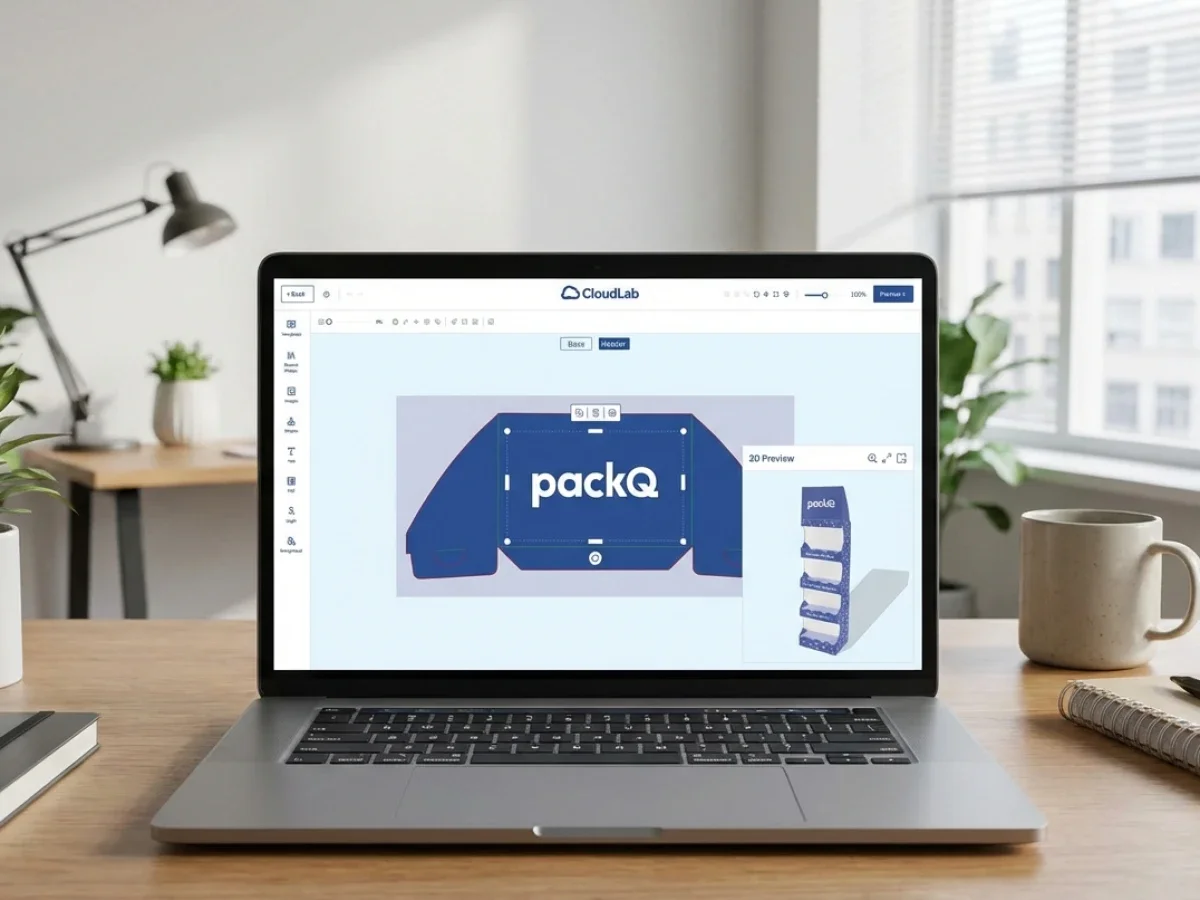
At the heart of packQ is a browser‑based 3D packaging designer. Users can create folding cartons, corrugated boxes and displays without installing CAD software. The online editor allows detailed modifications of images and text, while fold lines stay in place even when dimensions change. A live preview shows the exact structure in 3D, ensuring that the final product matches what the customer approved. The system also performs automatic price calculation: when size or material changes, packQ recalculates the cost instantly, eliminating lengthy price lists. This real‑time feedback accelerates approvals and reduces back‑and‑forth between design, sales and production.
ECMA & FEFCO library: industry standards built in
packQ includes a library of parameterised ECMA and FEFCO templates. The platform offers about 120 folding box designs, 290 corrugated models and 50 POS display templates. These standards provide common dieline structures while allowing custom dimensions. The ECMA codes classify folding carton designs with a combination of letters and numbers; they describe shapes but leave dimensions open, making it easy for partners to communicate by simply specifying a code and size. FEFCO codes, meanwhile, are an internationally adopted system for corrugated packaging design, created in the 1960s to replace long verbal descriptions with numeric codes. The latest edition includes more than one hundred new designs.
packQ's template library harnesses these standards with a CAD engine. Models can be customised dimensionally via 3D animations, and FEFCO codes cover shipping cartons and special products like POS displays. By using parametrised standards, packQ ensures that folds, gluing tabs and proportions remain correct even when sizes change. This reduces engineering effort and allows customers worldwide to order identical packaging types.
AI Designer Suite: image enhancement in the browser
CloudLab’s AI Designer Suite empowers non‑designers to prepare high‑quality artwork. The suite includes:
- Vectorize extension – converts raster images into vector graphics within seconds. Customers choose smoothing and colour settings, and the tool produces high‑quality vectors suitable for print.
- Effects and filters – designers can apply grayscale, sepia, vintage or Kodachrome effects and adjust contrast or brightness.
- Crispify – this AI feature increases image resolution by generating four times more pixels, transforming low‑resolution images into sharp graphics.
- Remove Background – a one‑click tool that removes backgrounds to isolate the main subject.
These features integrate seamlessly with packQ’s editor and run in the browser, eliminating the need for external design software. For embellishments, the Vectorization & Embellishment module adds foil stamping, embossing, letterpress and spot UV varnishing. Clients can specify which areas to embellish and preview the finishes in magenta or other colours. An automated hotfolder then passes the finishing instructions to the appropriate equipment.
Variable data printing: personalisation at scale
Mass customisation requires variable data. packQ supports PDF/VT and CSV uploads, enabling users to merge names, codes or images into packaging. Customers can upload Excel/CSV files or manually add and edit records for personalised campaigns. The system lets users check every detail of variable data to ensure that each record is correct before production. This feature allows marketers to run personalised promotions without separate prepress processes, and the 3D preview ensures that names or serial numbers appear exactly where expected.
Dynamic preflight: checking print data upfront
Misprints often result from incorrect resolution, colour modes or bleed settings. packQ’s Dynamic Preflight Check validates print data in real time. Unlike traditional workflows where checks occur after orders are placed, packQ checks critical requirements such as minimum font sizes, DPI and colour spaces as soon as artwork is uploaded. If corrections are needed, users are notified immediately. The system also integrates with leading tools like Enfocus PitStop and Callas pdfToolbox, which can be added with minimal setup. By catching errors early, packQ reduces production delays and avoids costly reprints.
Product configuration & dynamic calculation
packQ’s configuration tool allows users to select materials, colours and finishing options while it performs a plausibility check to detect incompatible choices. This ensures that only valid combinations proceed. The dynamic calculation module automatically computes prepress, printing and post‑press prices based on industry constants such as set‑up and run costs. Instead of consulting spreadsheets or quoting departments, customers see live prices as they adjust dimensions or quantities. This transparency speeds up decision‑making and improves margins.
Automated production workflow & hotfolders
Once an order is approved, packQ generates production‑ready PDF files, JDF tickets and XML/CSV data and sends them via hotfolders into the production workflow. The software can create multiple layers in the print file for cuts, folds and other aspects and automatically generate cutting dies. Standard‑compliant JDF and XML files are transferred to finishing machines and MIS systems. Hotfolder integration provides secure, dynamic data traffic and allows operators to monitor job status and intervene if customers uploaded incorrect data. The result is fewer errors and faster throughput times.

eCommerce integrations & API‑first architecture
packQ offers a headless, API‑first architecture. A dedicated shop connector lets non‑technical users integrate packQ with popular store systems via plug‑and‑play. The platform exposes SOAP and REST APIs and uses XML, JDF/XJDF, CSV or JSON files to connect with ERP, MIS and production systems. This flexibility means packQ can act as a back‑end packaging engine for e‑commerce platforms, automatically generating job tickets, reserving materials and scheduling production when a customer places an order. Because front‑ and back‑end are decoupled, developers can build bespoke user experiences while using packQ’s core logic in the background.
Template gallery, folding boxes and other modules
packQ’s product portfolio spans many packaging types:
- Folding boxes: The system displays each box interactively and in 3D, accounting for shape, size and type of fold. Users can design cosmetics, healthcare or food cartons in a few clicks.
- Corrugated board: packQ turns corrugated board into a design object; it supports folding cartons, cartons with adhesive closures or slip‑lid cartons.
- POS displays: Parameterised models allow customers to create stable point‑of‑sale displays with customised cut‑outs.
- Flexible packaging & labels: Modules for pouches and labels enable users to define gussets, zippers and sealing zones, with real‑time cost calculation.
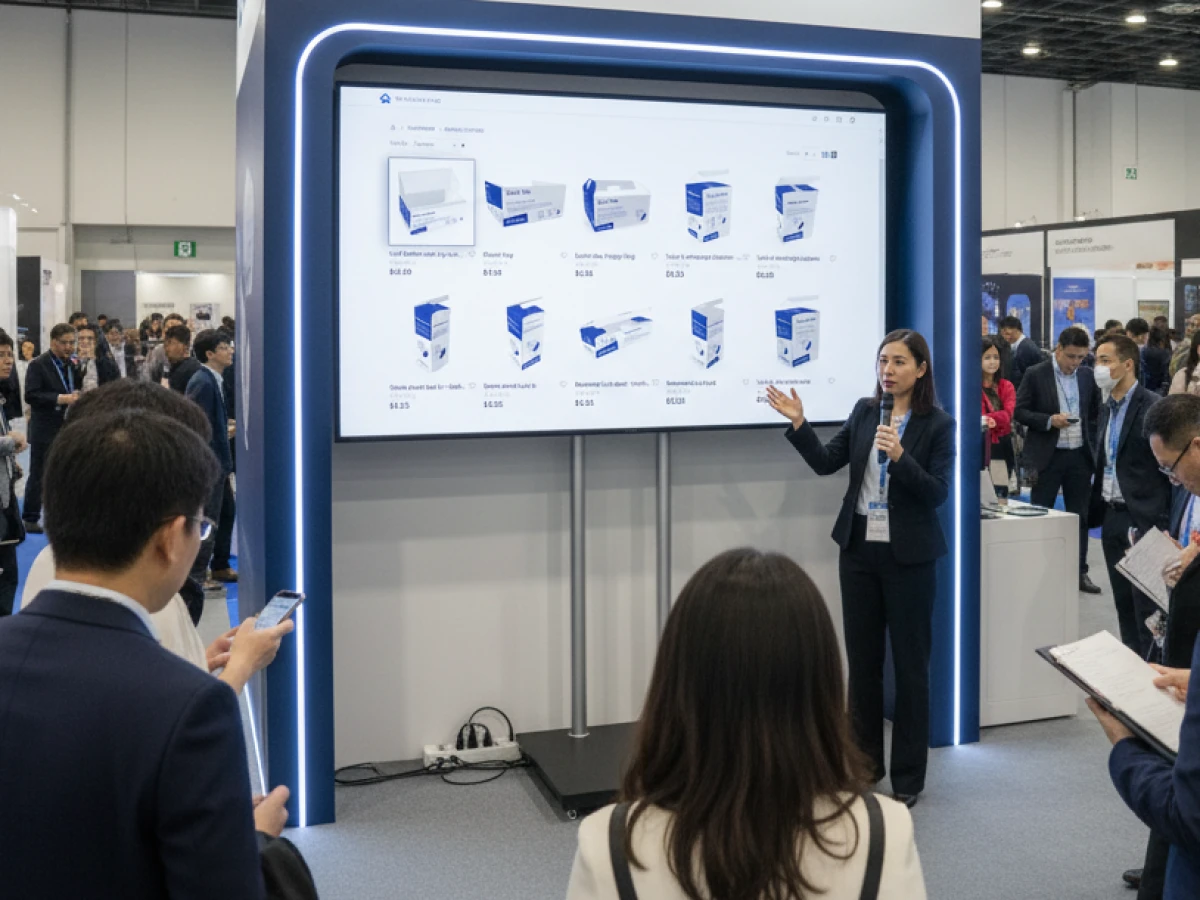
The Template Gallery contains hundreds of validated structures that can be adjusted via parameters; the mathematical model ensures that folds and tabs remain correct. This gallery reduces entry barriers for non‑experts and accelerates innovation.
Use cases and stakeholder benefits
Printers & packaging manufacturers
- Reduced make‑ready times: Automated cutting dies, job batching and gang runs increase throughput and make short runs profitable.
- Error reduction: Live preflight and plausibility checks catch issues before production.
- Integrated workflow: Standard‑compliant PDF, JDF and XML files flow directly into cutting and punching machines.
E‑commerce platforms & marketplaces
- New revenue streams: packQ can be integrated as a white‑label service so customers configure packaging at checkout.
- Instant pricing & 3D previews: Real‑time calculation and photorealistic models reduce customer support queries.
- Automated order handling: APIs create job tickets and synchronise inventory and production schedules.
Brand owners & industry (marketing, pharma, procurement)
- Creative freedom: The browser editor allows marketers to try multiple designs quickly without CAD knowledge.
- Personalisation: PDF/VT support means names, serial numbers or QR codes can be integrated seamlessly.
- Compliance & brand integrity: Standard templates and live previews ensure packaging meets brand guidelines.
Technology teams (IT, prepress, production)
- Headless architecture: Decoupled front‑ and back‑end allow seamless integration into existing stacks.
- Scalability: The cloud‑based platform scales from small pilot projects to enterprise installations.
- Industry 4.0 readiness: packQ exports data to MES and ERP systems and supports predictive maintenance by acting as a digital twin.
Bridging design and ERP – why integration matters
A distinguishing feature of packQ is its end‑to‑end connection between the design process and enterprise systems. Traditional packaging design workflows rely on manual hand‑offs: designers export dielines, prepress checks files for resolution and bleed, customer service issues quotes, and production planners rekey data into MIS systems. Each hand‑off introduces delays and errors. packQ eliminates these friction points by:
- Streaming production data: When a customer approves an order, packQ generates cutting and punching data, layer‑separated PDFs, JDF tickets and CSV files.
- Synchronising with ERP/MIS: The platform uses SOAP or REST APIs and standard file formats (XML, JDF/XJDF, JSON) to update inventory, schedule production and issue invoices.
- Automated job pockets: Each job receives a digital pocket with all relevant data; cutting dies and finishing instructions are created automatically.
This closed feedback loop means that pricing, stock availability and delivery dates are always up to date. Because packQ can be deployed as a private cloud or on‑premise, companies with strict data policies (e.g., pharma or regulated industries) can integrate without compromising security.
AI and Print 4.0: future‑proofing packaging design
Packaging design is increasingly influenced by machine learning and data‑driven automation. packQ already integrates AI features like Crispify, background removal and vectorization, which improve print data quality without external software. In the coming years, we can expect further innovations such as:
- Automated layout suggestions based on product dimensions and industry trends.
- Predictive preflight that anticipates errors using historical data.
- Sustainability optimisation, recommending materials and designs that reduce waste.
By building an API‑first platform, CloudLab positions packQ to adopt these innovations rapidly. Because preflight and workflow data are already digital, packQ acts as a digital twin: design changes can be simulated, resource usage predicted and maintenance scheduled. Companies adopting packQ will therefore be well prepared for Print 4.0 and Industry 4.0 initiatives.

Comparing packQ to traditional structural packaging design software
Traditional structural packaging design software like ArtiosCAD or KASEMAKE focus on CAD precision. According to AG/CAD, KASEMAKE provides accurate measurements and 3D visualisation but depends on standalone software and often requires physical prototypes. It speeds up the design phase with template libraries but does not integrate online shops or dynamic pricing. ECMA and FEFCO standards must be imported manually, and pricing and order management occur outside the software.
packQ differentiates itself by offering:
- Browser‑based 3D editor accessible from any device.
- Built‑in ECMA/FEFCO templates with parametric scaling.
- AI‑driven image tools like vectorization, resolution enhancement and background removal.
- Real‑time price calculation and variable data support.
- Integrated preflight and workflow automation with hotfolder export.
- Headless APIs for integration with shops, ERP and MIS systems.
In short, packQ combines CAD‑grade precision with web convenience and enterprise connectivity, making it more than just a design tool. It is an end‑to‑end structural packaging design software that extends from the customer’s browser to the cutting table.
Implementation scenarios: open shop, closed shop and beyond
packQ supports multiple deployment models to match business requirements:
- Open shop: Printers create a public storefront where any customer can configure packaging, upload artwork and place orders. Standardised templates, dynamic pricing and live previews allow printers to handle small runs profitably.
- Closed shop: Packaging manufacturers or brand owners restrict access to selected customers, such as corporate clients or franchisees. Customers can reorder existing cartons, make minor layout changes within a defined framework and track orders; this increases loyalty while protecting core business.
- White‑label integration: E‑commerce platforms embed packQ into their checkout process, enabling on‑demand packaging for products such as subscription boxes or personalised gifts. APIs ensure that orders flow directly into production and ERP systems.
These models allow companies to adapt packQ to B2B or B2C workflows. They also support hybrid scenarios where a closed shop for corporate clients coexists with an open shop for retail customers. Because packQ is modular, features like variable data or AI tools can be enabled only for specific users, ensuring scalability and cost control.
Summary
packQ is more than a design editor—it’s an ecosystem that connects creative customization with production and e‑commerce. Users can design everything from folding cartons and flexible pouches to POS displays and labels, personalize products with variable data, apply embellishments, and preview results in 3D. Integrated AI tools and preflight checks improve artwork quality and ensure data accuracy. Production automation and flexible APIs help printers streamline workflows, reduce errors and connect with existing systems, making packQ a comprehensive platform for web‑to‑pack operations.
Future trends: personalisation, sustainability and speed
Packaging trends point toward more personalisation, sustainable materials and faster time‑to‑market. Variable data and mass customisation capabilities make packQ suited for batch size 1 production. Its integration of ECMA/FEFCO standards and real‑time 3D visualisation reduces the need for physical prototypes, saving material and reducing waste. As sustainable materials gain popularity, packQ’s flexibility allows printers to define new substrates and update cost calculations instantly. Meanwhile, AI features like Crispify ensure that even low‑resolution customer artwork prints crisply without manual intervention.
In combination, these trends demand software that is agile, intelligent and integrated. packQ’s API‑first architecture and modular design ensure that it can evolve with industry needs. For companies embracing circular economy principles, the ability to track material usage and integrate with sustainability dashboards via APIs will become increasingly valuable.
The transition from traditional CAD tools to cloud‑based web‑to‑pack platforms represents a strategic opportunity for printers, packaging manufacturers, brands and e‑commerce businesses. packQ is more than a configurator – it is a comprehensive structural packaging design software that unites 3D design, standardised templates, AI image tools, variable data printing, dynamic preflight and automated workflow management. Its headless architecture and API connectivity bridge the gap between design, pricing and production, ensuring that what customers see in the browser becomes a production‑ready file synchronised with ERP and MIS systems. By embracing standards like ECMA and FEFCO, packQ reduces complexity and enables mass customisation. Through automation and AI, it delivers quality and speed for batch size 1 production and positions users for Industry 4.0. For decision‑makers seeking to modernise their operations and delight customers, packQ stands out as the leading choice in structural packaging design software.
An overview of all features of packQ developed by CloudLab
- 3D Packaging Designer – Design folding cartons, cartons and other packaging directly in the browser and instantly see how your product will look thanks to the real‑time 3D preview. Dimensions can be adjusted and prices are recalculated automatically.
- ECMA and FEFCO Library – Gives access to standardised templates for folding cartons, corrugated boxes and POS displays. The parametric models are based on the internationally recognised ECMA and FEFCO codes and can be customised.
- Vectorisation & Finishing – Pixel images are converted into high‑resolution vector graphics in just a few clicks. Finishing options such as foil stamping, spot UV varnish or embossing are also available to enhance the product.
- Variable Data Printing (PDF/VT) – Enables the import of personalised data or images via CSV/PDF‑VT upload. Data can also be added manually, allowing both one‑off pieces and large series to be produced efficiently.
- Template Gallery – A large selection of ready‑made templates accelerates the design process. The AI‑based “Liquid Layouts” automatically adjust designs to different formats while preserving the original design concept.
- Folding Boxes – Configure folding cartons with various closure types, viewing windows and embellishments. An interactive 3D preview provides complete control over material, format and features.
- Corrugated Board – Design corrugated packaging including special formats. The software supports different materials and special colours, automatically checks fold and cutting lines and shows the folding sequence in an animated view.
- POS Displays – Create individual product displays with configurable shelves and trays. Logos, text and QR codes can be placed precisely; a 3D preview shows the result from every angle.
- Flexible Packaging – For stand‑up pouches, mailing bags or film packaging, the print area and bleed can be defined in the backend. PackQ automatically trims artwork to size and marks relevant production dimensions directly in the editor.
- Labels & Stickers – Offers a wide range of label shapes and sizes. Materials, coatings and finishes can be freely selected; a preview shows the label directly on the packaging. Both data imports and manual entries are supported.
- AI Designer Suite – A set of image‑editing tools: raster images can be vectorised, resolution enhanced four‑fold with “Crispify”, and backgrounds removed automatically. Various filters are also available.
- Dynamic Preflight Check – Print data is checked in real time for resolution, colour mode and other criteria during configuration. This allows errors to be corrected before the job goes into production.
- Production Workflow – Once an order is placed, all relevant print and production data are generated automatically, including JDF/XML files. Hot‑folder integration ensures seamless transfer to printing and die‑cutting equipment.
- Product Configuration & Calculation – Enables detailed selection of materials, colours and finishes with inputs checked for plausibility. Dynamic pricing calculates realistic production costs based on industry‑standard parameters.
- eCommerce Integrations & APIs – Thanks to the “packQ Shop Connector”, the software can be connected to common shop systems without programming knowledge. Through REST/SOAP APIs and formats such as JDF, XJDF or JSON, packQ also integrates into ERP and production systems.